A first-person, knife throwing project in Unreal Engine.
Introduction
Project Knives is my personal project as an in-between project because I want to keep making games and keep developing my skills. For the project, I wanted to emphasize on the game feel and make the player’s actions feel impactful and satisfying. Also, I wanted to be able to showcase work that I do, as everything from past projects is locked under NDAs.
I chose the mechanic of throwing knives at enemies as my core mechanic, as it looks cool and has a good transfer of energy that I can use as reference for my animations, impact effects and projectiles. I also enjoy making animations and VFX, so I had a nice case to dive a bit deeper in those too.
I will highlight various challenges that I encountered during development on this page, expanding as I go.
The Challenge of a Satisfying Knife Throw
My goal was to create a fast-paced throwing knife in first person that felt satisfying to throw and punchy to hit with.
I ruled out extreme curved throwing angles or arcs for the main attack in early tests, as they would require some sort of aim assists or visual trajectories, which would take out the fast-past nature of the throw.
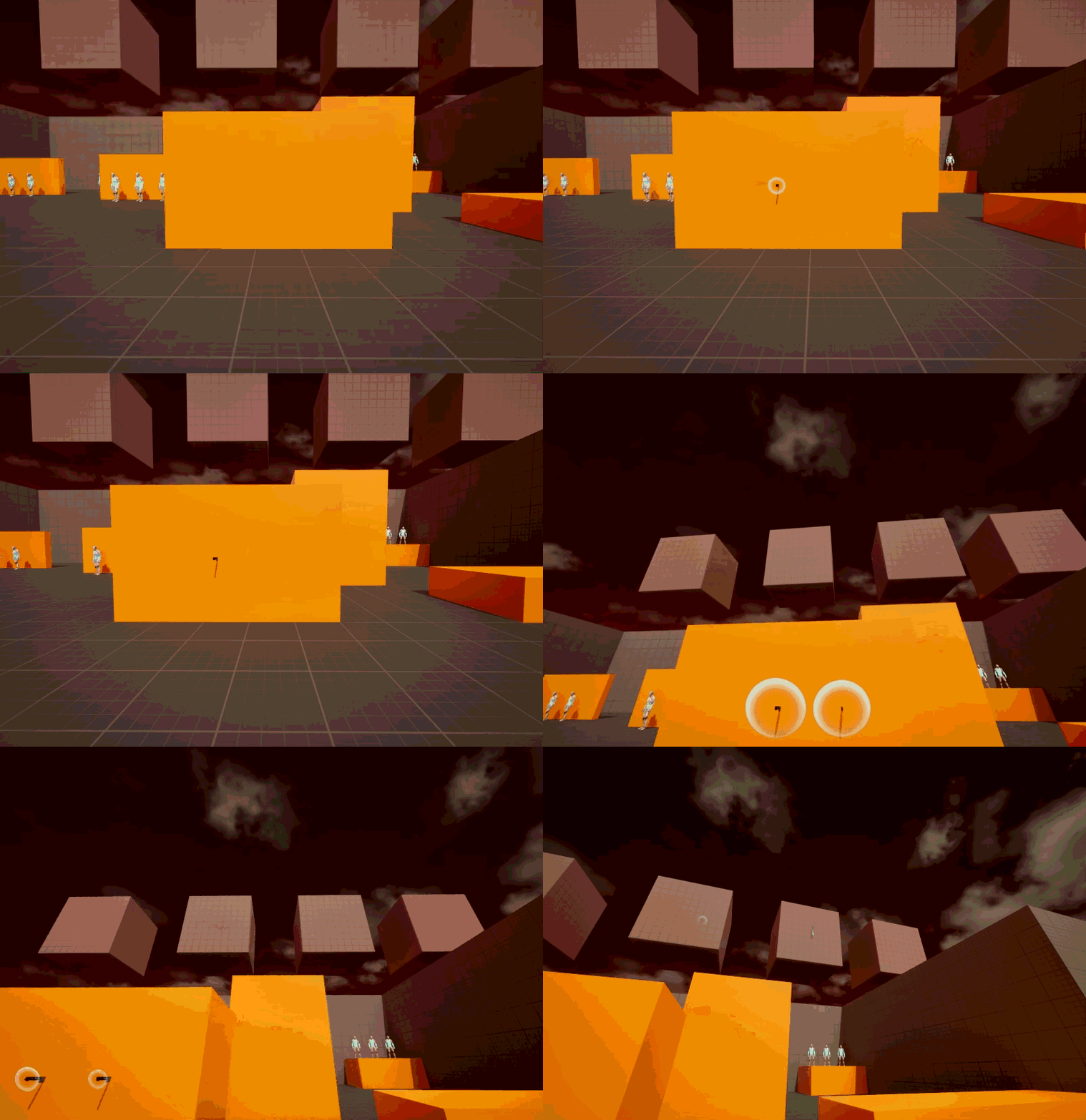
Spawning the projectile from the center of the camera gave me the precision I wanted, but spawning it inside the players’ viewport abruptly was quite jarring.
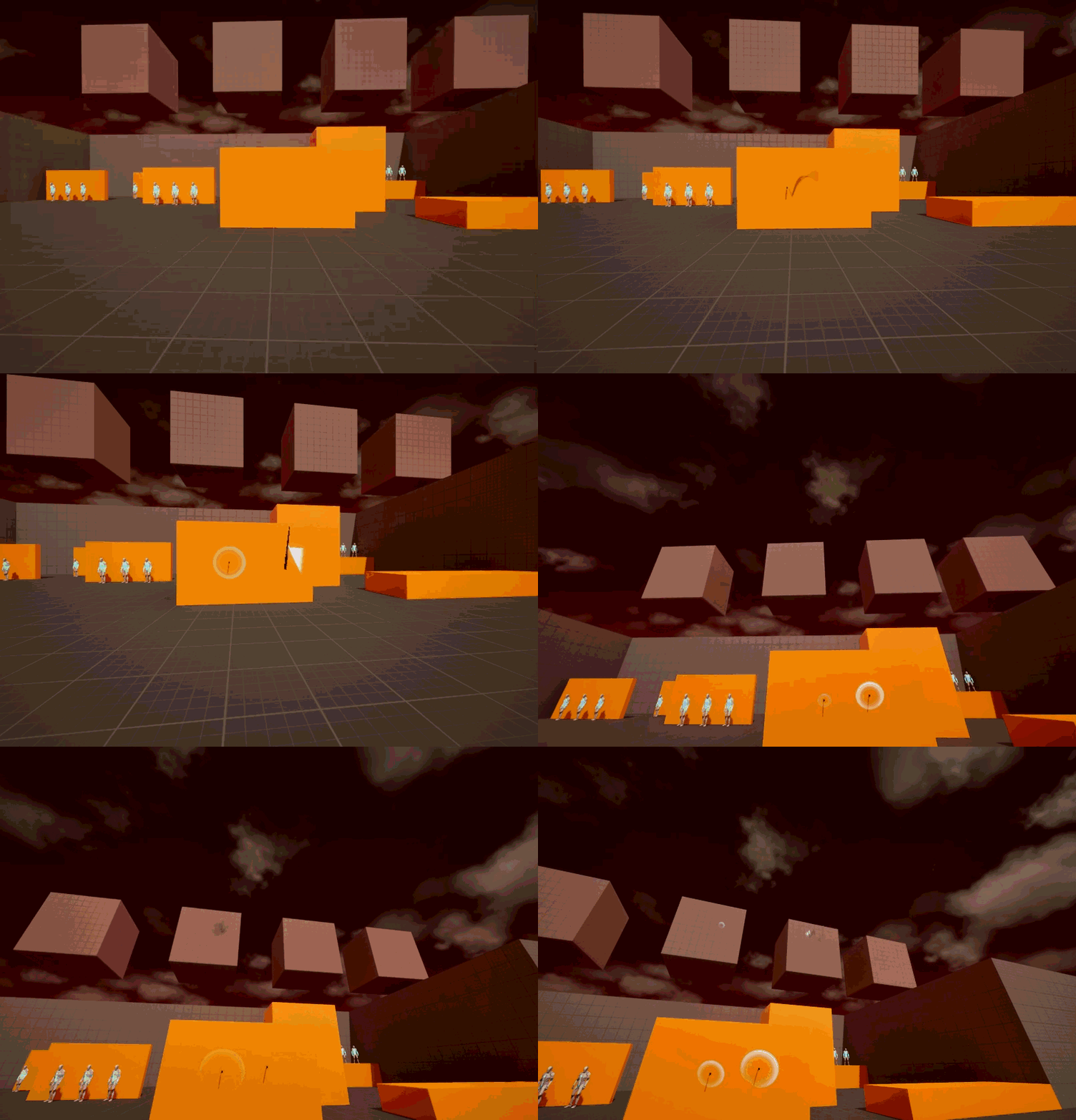
I studied other FPS titles like ULTRAKILL and Cyberpunk2077, I found that the solution was to spawn the knife from the side where the weapon was, which gave a better sense of its origin trajectory.
However, spawning from the side is a different trajectory than straight forward from the camera. I solved this by spawning the knife to the side of the camera, then calculated its path to the precise target as from the player’s cursor. This gave both the precision of a direct aim of an FPS and an improved visual trajectory.
A side effect of this solution was that the occasional knife that would hit an unintended target to the side of their crosshair. While a future iteration could use a more complex implementation of separating the projectile and raycast, I think that the current version adds something that players can master.
Spawning the knife in the centre of the screen feels sudden and doesn't frame the rotation of the knife very well.
Spawning from the side gives a better depth view of the knife, especially when it's rotating in flight.
Players can hit unintended targets to the right of their trajectory.
Enemy Impact Feedback
Hitting enemies is a core action in my project, so I wanted to this feel as visceral and weighty as I could, rather than just a single hit animation that I had at first.
I studied games with satisfying combat and known for being ‘juicy’, and analyzed how they handled enemy reactions and boiled it down to the following improvements I could make:
Enhanced Impact: I combined hit stop, quick hit flashes, and subtle screenshake to add extra weight to every impact.
Contextual Reactions: Enemies play directional hit animations based on where the knife came from.
Persistence: Knives visibly stick into enemies, and defeated enemies leave behind ragdolls, showing the chaos that the player has left behind.
In the end, it was only after I added the sound effects that everything really came together in a super-satisfying primary attack. (See video below for results.)
Expanded Combat Systems
Knife Recall & Knife Manager
During my research, I came across a mechanic where players can recall their thrown knives back to them, dealing damage on the way back. As I eventually wanted some kind of ammunition system, I thought this was a cool solution to getting the knives back, and on the way back, they can deal damage to enemies.
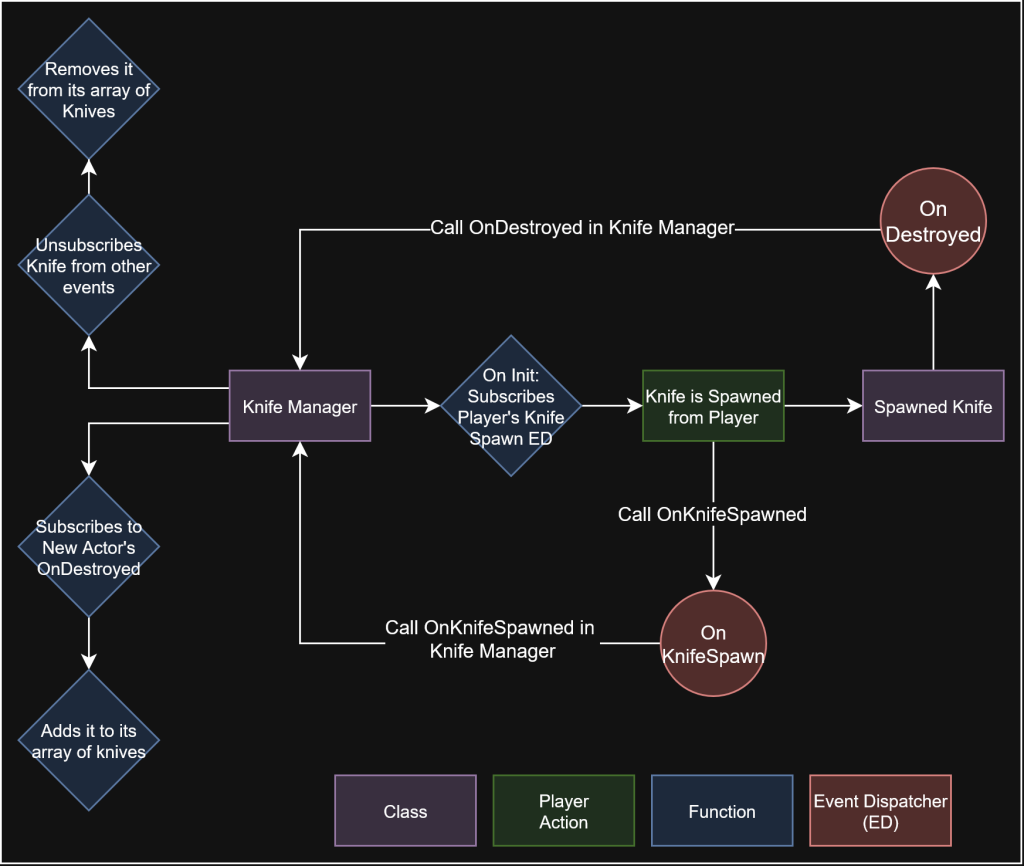
While the number of knives thrown rapidly expanded, I opted for creating a Knife Manager to keep track of all the knives. This knife manager keeps track of all knives spawned in order, allowing it to clean up if there are too many projectiles in the world. When a knife is destroyed, it also cleans it up. See the diagram below for its structure.
Calling a recall function on each knife was easy now that we keep track of every knife. I first opted for creating a recall function on the projectile, but that bloated the projectile base class. I instead opted for spawning a new projectile and destroying the old one. The new Recall Projectile copies the necessary data and then sends it flying back to the player, damaging enemies on the way back.
I think the design itself works well in the first-person environment, and a nice side effect of the recall was that it could be combined with a throw, players could perform ‘boomerang’ type throws, where they can throw the knife out and immediately call it back to cause damage twice.
It immediately reminded me of God of War’s Leviathan Axe, and I might be able to make some fun puzzle mechanics with it in the future, like hitting enemies from behind or activating switches that the player can’t reach.
The Knife Manager keeps track of each knife spawned and destroyed.
Knife Throw Variants
I wanted to make a piercing projectile next that could inflict headshots and would still stick inside static meshes hit. My previous projectile relies on a collision hit, which returns the bone name that was hit to the hit character. However, for the piercing projectile I needed an overlap event, which unfortunately, does not return a hit bone name.
I solved this by performing a raycast as soon as a target is hit by the overlap that aligns exactly with the projectile’s direction and collision. The raycast would return a hit bone name, which would mean my headshot would work as normal.
The next issue was that when multiple characters were standing close to each other, the raycast returned multiple hits, inflicting more damage than intended. I solved this by adding actors that were already hit to an ignore list inside the projectile, something I added as a failsafe to all other projectiles.
In the future, I might set up the hit detection with custom hitboxes or physical materials instead, which might make this system redundant, as it does not rely on hit bones.
As the projectile begins to overlap, I raycast to get the specific bone.
Throwing Knives in Patterns
As many of my references are about characters throwing multiple knives at once, I wanted to make some abilities that supported this fantasy. The Recall ability was also more exciting to use when there are more knives to recall, so I wanted to make some ‘pattern’ throws, such as a Fan of Knives that throws out a larger amount of knives at once.
I wanted to spawn projectiles at different locations than just from the player in the future, I opted to create a ProjectileSpawner blueprint to handle the more complex spawning of multiple knives at once.
In this blueprint, I created three options for sending the knives in a trajectory, but my initial spawning method was not a good solution as the spawning took the player’s aim and spawned the knives from that point and added the degrees to the right.
I had to change my logic to start at the half-point and then and spawn the knives along positive and negative degrees that fan out to the left and right from the aiming location.
A side effect of this method is that an even amount of knives will never spawn a knife at the center of the player’s cursor. For precise aiming, I could implement some kind of aiming-assist for this, but as the game is rather fast-paced, I did not see the need of it, and found that it’s rather a skill that can be mastered by the player, such as Genji’s Fan of Blades attack from Overwatch.
Spawning over the radius should keep player's aim at the center and divide the projectiles over left and right instead..
Dash
The dash’s design is that players can dash in any direction on the ground or airborne with their provided movement input (WASD or the left joystick), and if there was no input provided, the character would dash forward.
Unreal has a couple of build-in provided options, but these mostly rely on bursts, which doesn’t allow for the level of control that I wanted.
Changing the velocity works, since that allows me to preserve the previous velocity instead of adding to it and overshooting it. I control this with a timeline so I can get the smooth feeling of a EaseOut curve, but first save the velocity so we can restore it afterward.
I save the last movement input pressed to get the dash direction, ignore the Z axis, and check if it’s not 0. Else, we fall back to a forward dash.
While dashing, I also disable breaking and the character’s friction, so the air dash works the same as a dash on the ground.
Finally, I have dash visuals are a bit different from the dash curve, so I run another timeline that aligns up with the dash timeline, but controls the visuals.
Polish & Supporting Systems
UI Feedback
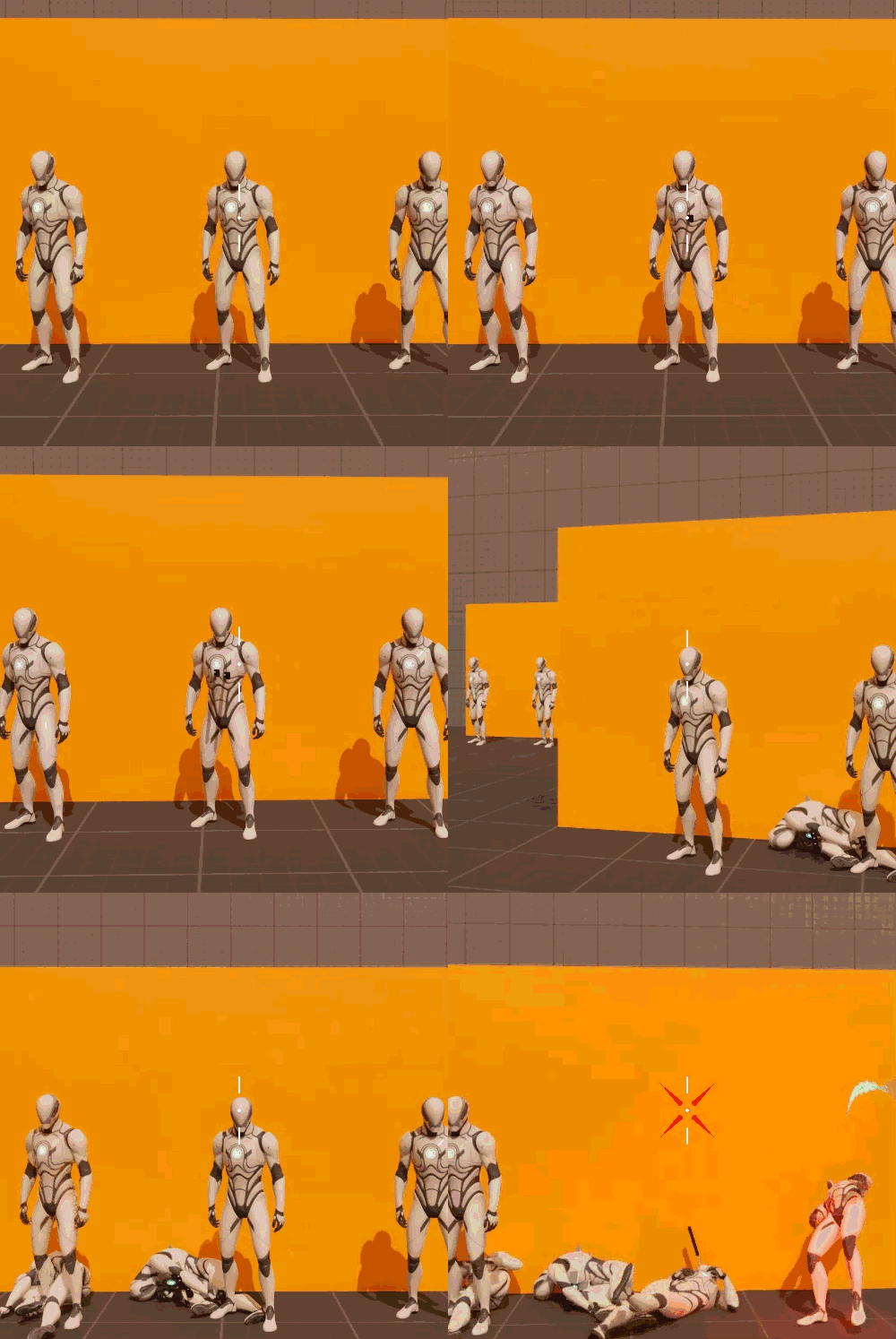
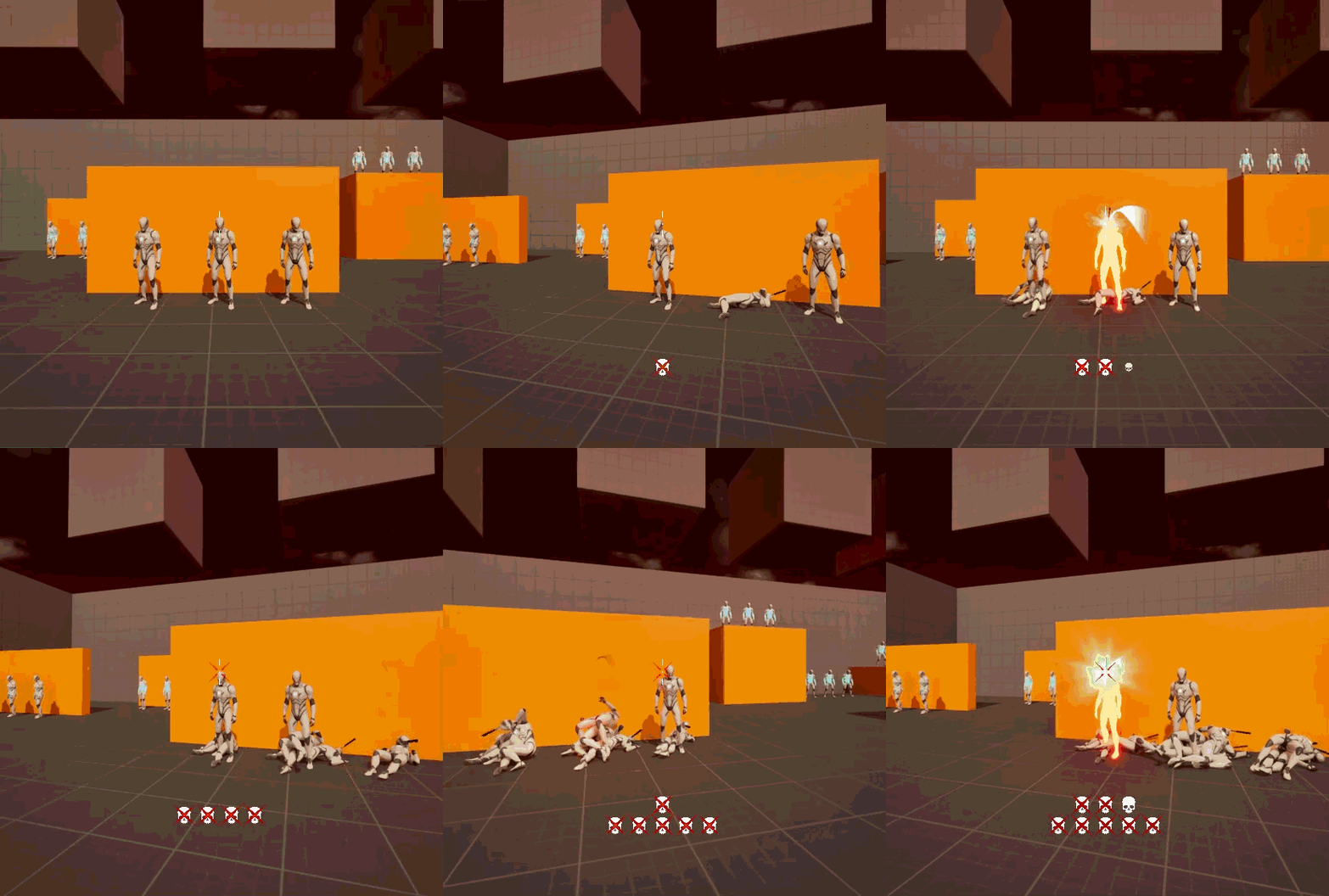
To reinforce the impact of combat, I added reactive UI elements alongside the diegetic effects. The crosshair dynamically responds to hits (yellow) and kills (red), giving instant feedback at the center of the player’s focus. I also built a lightweight kill counter widget that stacks icons for consecutive kills, rewarding streaks and keeping momentum high.
The hit marker changes when knives are thrown and spawns markers when a target is hit or killed.
Without gameplay mechanics that tie into an aggressive playstyle (yet), the kill counter offers a visual reward to emphasize kills in rapid succession.